AI agents can help Australian businesses reduce repetitive admin, respond faster to customers, and keep routine work moving. But the most useful AI agent workflow does not start with AI.
It starts with a business process.
An enquiry arrives. A booking needs confirming. A quote has not been followed up. A customer email needs sorting. A completed job needs to move from job management software into accounting. These are operational workflows that already exist, whether they are managed properly or not.
A well-designed AI agent can handle the parts of those workflows that require interpretation, such as understanding an email, identifying what a customer wants, extracting information from a document, or preparing a response. Workflow automation then handles the predictable actions around it: creating records, sending reminders, updating systems, assigning tasks and escalating exceptions.
For small and mid-sized businesses, the goal is not to introduce AI everywhere. It is to remove avoidable manual work from the workflows that are already costing the team time.
This is the workflow-first approach we use across AI integration, business automation and systems integration: understand the bottleneck first, then decide whether AI, fixed automation, a system connection or a human decision is the right tool.
What makes AI agents different from ordinary chatbots?
A traditional chatbot usually has one main job: respond to a conversation.
It might answer a common question, provide information, collect a few details or send the customer to a person.
An AI agent can go further because it can participate in a wider workflow.
For example, instead of simply answering “Do you service Melbourne?”, an AI agent could identify the customer’s location and job type, ask for the missing details, create or update the customer in the CRM, pass the request into the company’s job management software and alert the right team member.
The important difference is not that the agent sounds more intelligent. It is that the conversation can lead to useful actions across the business.
That is why AI agents work best when connected to a clearly defined AI workflow rather than operating as a standalone chat tool.
How are AI agents different from traditional workflow automation?
AI agents and traditional automation solve different parts of a process.
Traditional workflow automation works best when the rule is predictable:
- When a job is marked complete, create an invoice.
- When an appointment is booked, send a reminder.
- When a new form is submitted, create a CRM record.
- When an invoice becomes overdue, send an approved follow-up.
AI is more useful when the input varies and the system needs to interpret it.
An AI agent might read an enquiry and work out whether it is a booking request, an urgent support issue or a general question. It might extract information from a referral document, summarise a customer conversation or prepare a draft response.
A dependable business process automation often uses both.
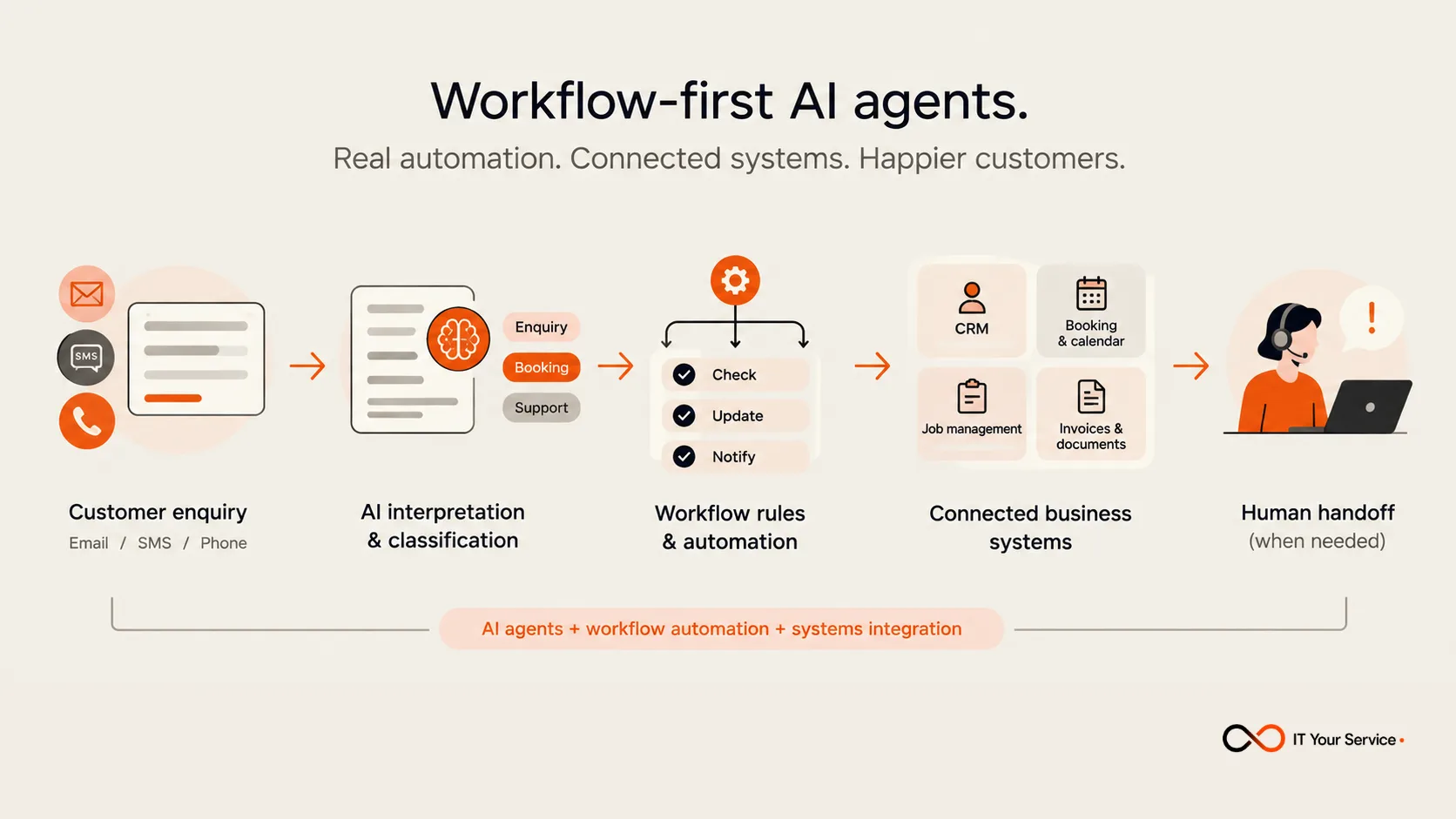
AI interprets. Automation executes. Systems integration moves the information. People handle the exceptions.
We use the same principle in our AI Integration service: AI is used where language, documents or variable requests need interpretation, while exact outcomes remain controlled by fixed automation rules.
AI agent workflows work best when the process is clearly defined
The strongest AI automation projects usually begin with a plain-English process map.
Before choosing technology, the business should understand:
- Where does the work start?
- What information is needed?
- Which decisions follow a clear rule?
- Which parts require interpretation?
- Which business systems need to be updated?
- When should a person take over?
Instead of giving an agent a vague instruction such as “manage customer enquiries,” a better workflow might be:
Receive enquiry → identify service type and location → ask for missing details → create or update the CRM record → create the next task → alert the relevant team member → escalate urgent or unusual requests.
That is workflow management in practice. The AI agent has a defined job and boundaries rather than unrestricted responsibility.
A useful agent should also know what it cannot do. An AI email assistant might sort messages, prepare routine replies, identify urgency and update customer records. It should not make unusual commercial promises, change sensitive details or make high-impact decisions unless those actions have been explicitly designed and approved.
If the underlying process is unclear, adding AI usually does not fix it. It simply automates part of the confusion.
Practical AI automation workflows for Australian SMBs
AI agents can support many parts of a business, but the best use cases are usually repetitive, high-volume workflows where information needs to be interpreted, updated, routed, or followed up. Here are some practical AI automation workflows Australian SMBs can relate to:
- Customer enquiry triage: Incoming emails, forms, or messages can be classified by topic, urgency, or service type, then routed to the right person or workflow for follow-up.
- Booking reminder automation: Once an appointment is confirmed, workflow automation can send SMS or email reminders, handle basic confirmation responses, and update the booking system automatically.
- Job management software updates: For trades and service businesses, an AI agent can extract job details from an enquiry and pass them into job management software, helping reduce manual data entry between customer communication and operational systems.
- Quote follow-up: An AI agent workflow can check outstanding quotes, send approved follow-up messages, record responses in the CRM, and alert staff when a customer shows buying intent.
- Invoice follow-up: Business automation can monitor overdue invoices, send scheduled reminders, update payment status, and escalate accounts that need personal attention. Our guide to automated invoice reminders covers the schedule and handoff rules in detail.
- Document processing: AI can read incoming documents, extract useful information, classify them, and send the data into the right system or business process automation workflow for review.
- Email routing and response preparation: An AI agent can categorise inbox messages, draft routine responses, identify urgent requests, and route exceptions to the appropriate team member.
- Internal approvals: AI can help summarise requests or supporting documents, while workflow management rules route the request to the correct approver and record the outcome.
- Customer support: AI agents can handle common service enquiries, retrieve relevant information from connected systems, and escalate more complex cases to a person when needed.
- Appointment scheduling: An agent can collect availability, identify the appropriate service or staff member, and connect with calendars or booking platforms through systems integration.
- Customer re-engagement: AI automation can identify customers due for another service, send a personalised follow-up, and record the result in the CRM.
The common thread is that the AI agent is not working alone. It sits inside a connected workflow, using AI automation, workflow automation, CRM systems, job management software, and systems integration to move work from one step to the next.
For most SMBs, the best starting point is not “Where can we use AI?” but “Which repetitive workflow is costing us the most time?”
When should a business consider an AI agent?
An AI agent may be worth considering when a workflow has several of these characteristics:
- the task happens frequently;
- staff repeatedly read or interpret emails, messages, calls or documents;
- the next step depends on what the customer has said;
- information then needs to be entered into another business system;
- delays or missed follow-ups have a measurable operational impact;
- the business can clearly define situations that require human judgement.
AI may not be necessary when the workflow is completely predictable.
If the requirement is simply “when X happens, do Y,” ordinary workflow automation or business process automation may be simpler, cheaper and more dependable.
That distinction matters. Businesses do not need AI for every workflow, and using AI where a fixed rule would work can introduce unnecessary complexity.
Common misconceptions about AI agents
One misconception is that an AI agent is simply a more advanced chatbot. A chatbot can be part of an agent workflow, but the real value comes when the conversation connects to actions and business systems.
Another is that AI agents replace workflow automation. In practice, the opposite is often true. Useful AI agents rely heavily on workflow automation and systems integration to control what happens before and after the AI performs its task.
A third misconception is that an agent needs broad access to the entire business. It usually should not. A dependable AI agent has a specific job, limited data access, clear actions it is allowed to perform and a defined point where a person takes over. Our AI Agents service uses exactly this model: defined task, limited access and clear handover rules.
How should a business choose the right AI automation services?
Start with the workflow rather than the AI platform.
A useful evaluation process is to identify one operational bottleneck, map how it works today, decide which systems need to connect, and then determine which individual steps require AI.
Before implementation, consider:
- The workflow: What manual process are you trying to improve?
- The systems: Does the workflow involve your CRM, job management software, accounting system, booking platform, email or other tools?
- The AI task: What specifically needs interpretation rather than a fixed rule?
- Data access: What information does the agent actually need?
- Human handoff: What situations should stop the workflow and go to a person?
- Measurement: Will success mean faster response time, fewer missed follow-ups, less admin, cleaner records or another measurable outcome?
This approach keeps the project focused on operational improvement instead of adding technology for its own sake.
Responsible implementation matters in Australia
AI agent workflows that use personal information need to be designed carefully.
The Office of the Australian Information Commissioner advises organisations to consider privacy and security risks, human oversight, who can access personal information and whether the AI product is appropriate for the intended use. It also recommends, as a matter of best practice, avoiding the entry of personal, and particularly sensitive, information into publicly available generative AI tools.
Practical safeguards include limiting the data an agent can access, logging important actions, using approved systems, defining escalation rules and keeping staff review in place where the risk or uncertainty is higher.
This is especially relevant for businesses handling health, financial, employment or other sensitive information.
Costs and government support should be assessed carefully
The cost of AI automation depends less on how fashionable the AI model is and more on the complexity of the workflow.
A narrow AI agent connected to an existing CRM may be relatively straightforward. A workflow that spans CRM, job management software, accounting, telephony, calendars and custom business logic requires more systems integration, testing and exception handling.
Australian businesses can also review current government support, but funding information should always be checked at the time of planning. The Australian Government’s AI Adopt Program grant itself is currently closed to applications, although AI Adopt Centres are operating to support eligible SMEs in relevant sectors.
Start with the operational bottleneck, not the AI
The most useful AI agents are not standalone tools trying to run the business.
They are one part of a connected workflow.
A customer enquiry comes in. AI interprets what the customer needs. Workflow automation applies the rules. Systems integration updates the right CRM, booking platform or job management software. A person takes over when judgement is required.
That is what makes an AI agent workflow useful: the technology is tied to a clear operational outcome.
For an Australian SMB, the best first question is therefore not: “Where can we use AI?”
It is: “Which repetitive workflow is costing our team the most time, and what should happen instead?”
To see practical examples of how AI agents can handle enquiries, inboxes, booking reminders, quote follow-ups and other routine workflows, explore IT Your Service’s AI Agents page.