Workflow software helps Australian teams move work from request to completion with less chasing, fewer manual handoffs, and clearer ownership. The right mix of team collaboration tools, task management apps, process automation software, and project management software can make everyday operations easier to track and improve. This guide explains what these platforms do, where they fit, and how to choose business workflow solutions that match your team’s size, systems, and working style.
What do workflow tools actually do?
Workflow tools help teams define, assign, track, review, and complete work through a clear sequence of steps. Instead of relying on scattered emails, spreadsheets, chat messages, and memory, a workflow platform gives everyone a shared place to see what needs doing, who owns it, what stage it is in, and what happens next.
In practice, this might mean an invoice is automatically routed to the right manager once it reaches a certain amount. Or it might mean a customer support issue is assigned, escalated, and resolved without someone manually checking every inbox.
Good workflow software reduces “work about work”: status chasing, duplicated updates, missing files, unclear approvals, and meetings that exist only because no one can see progress. That is why workflow optimisation is not just about speed. It is about making work more visible, repeatable, and easier to improve.

The main benefits for Australian businesses
Australian businesses often work across distributed teams, hybrid schedules, interstate time zones, external suppliers, and compliance-sensitive processes. When work is not clearly structured, small delays can spread quickly. A missed approval in Melbourne can hold up an invoice or job in Perth; an unclear handoff between operations and finance can delay a customer outcome.
Workflow software creates a practical operating layer between people, systems, and decisions. It helps teams keep momentum even when everyone is not online at the same time.
Key benefits include:
- Clearer accountability: Tasks have owners, due dates, dependencies, and status updates, so responsibility is visible instead of assumed.
- Faster approvals: Conditional routing can send items to the right person based on department, budget, risk level, or project type.
- Less repetitive admin: Automations can create tasks, send reminders, update records, notify stakeholders, and move work between stages.
- Better project visibility: Dashboards and reports help managers spot bottlenecks before they become missed deadlines.
- Improved resource planning: Teams can see who is overloaded, where priorities clash, and which work needs to be rescheduled.
- More consistent processes: Templates reduce variation, especially for recurring work such as onboarding, job handovers, procurement, and reporting.
The strongest gains usually come when workflow software is used to simplify real pain points, not when a business tries to digitise every process at once. Start with the work that causes the most delays, errors, or repeated questions.
Workflow software, collaboration tools, and project management software work together
The terms can overlap, but they are not identical. Understanding the difference makes it easier to avoid buying a platform that solves only part of the problem.
Team collaboration tools help people communicate, share updates, comment on work, and stay aligned. They are useful when conversations and files need to stay connected to the task or project they belong to.
Task management apps focus on assigning, prioritising, and completing individual pieces of work. They are often simple to adopt and helpful for small teams, recurring task lists, and personal productivity.
Project management software manages broader initiatives with timelines, milestones, dependencies, resources, and reporting. It is best suited to work with a defined goal, start date, end date, and delivery plan.
Process automation software goes further by using rules, triggers, integrations, and sometimes AI to move work automatically. For example, when a form is submitted, the system can create a task, notify a manager, update a CRM, and schedule a follow-up.
Modern business workflow solutions often combine all four. But they also need to connect effectively with the systems a business already uses. That systems integration matters because separate tools can create new silos. If tasks live in one system, approvals in another, documents in a third, and reporting in a spreadsheet, teams still waste time joining the dots.
Which workflow type fits your process?
The best workflow structure depends on how the work moves, who needs to be involved, and how much variation exists from one case to the next. Choosing the right type helps you automate without making the process rigid or confusing.
Common workflow types include:
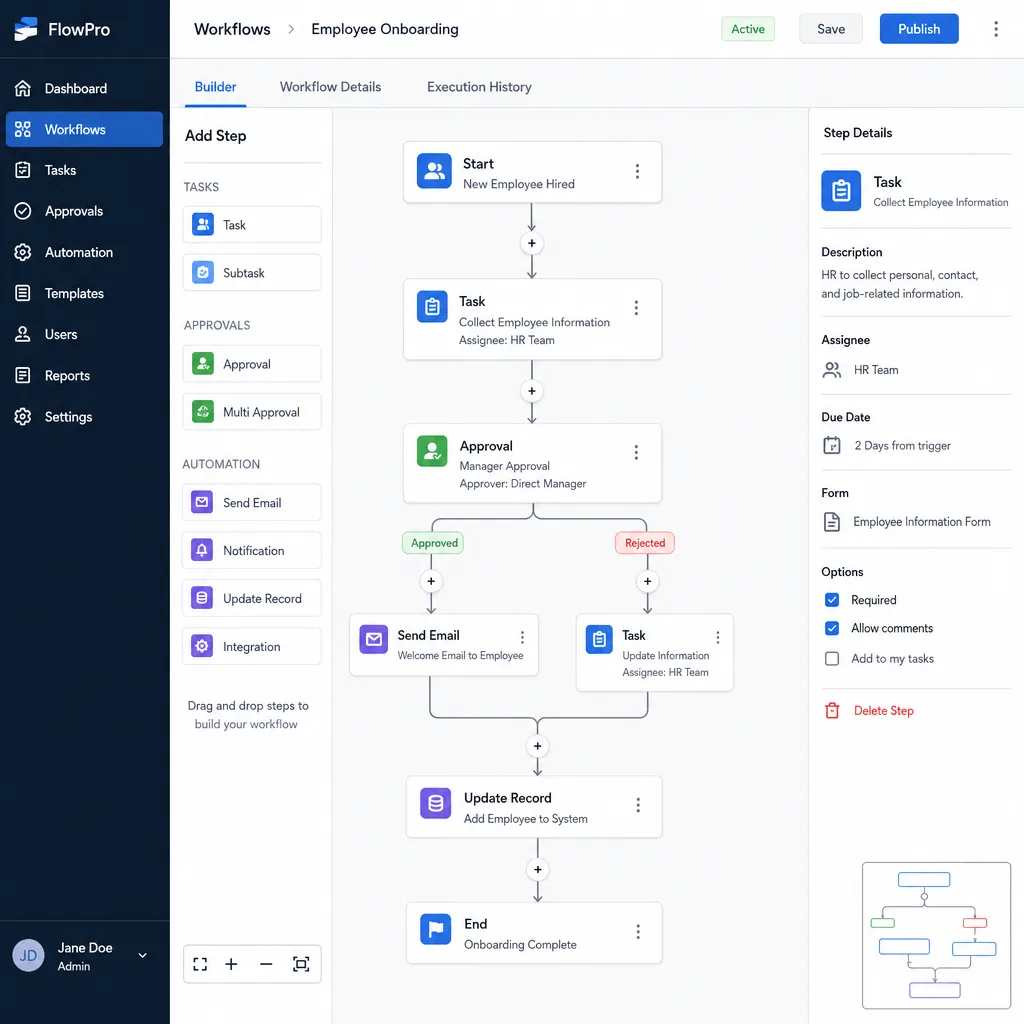
- Sequential workflows: Work moves step by step in a fixed order. This suits approvals, publishing, compliance checks, and onboarding tasks where one stage must finish before the next begins.
- Parallel workflows: Several tasks happen at the same time. This is useful when document collection, account setup, finance checks, and internal approvals can progress together before a final handover.
- Conditional workflows: The next step changes based on a rule. For example, a purchase request under a set threshold may go to a team lead, while a higher-value request goes to finance.
- Case-based workflows: The path depends on the details of each request. Customer enquiries, service requests, complaints, and support tickets often need flexible routing.
- Automated digital workflows: Software handles triggers, notifications, task creation, data updates, and reporting. This is where process automation software can remove routine manual effort.
A practical approach is to map the workflow before choosing the tool. Write down the trigger, stages, owners, decision points, required information, and final outcome. If the process is unclear on paper, software will usually make that confusion more visible rather than solve it automatically.
Popular categories of workflow software solutions
There is no single “best” platform for every organisation. A small trades business, a growing construction firm, a healthcare provider, and a professional services firm may all need workflow tools, but their priorities will differ.
Some platforms are known for accessible project and task management. Asana is often considered by teams that want flexible task views, reminders, and project coordination. Trello is popular for simple Kanban boards and easy visual tracking. Monday.com is widely used by teams that want colourful, configurable boards that are quick to understand.
Other platforms lean into depth and customisation. ClickUp offers a broad all-in-one workspace with many views and configuration options, which can be powerful but may require careful setup. Wrike is often considered for structured approvals and more controlled workflows. Adobe Workfront is designed for advanced work management, especially where creative production, proofing, and resource alignment matter.
For spreadsheet-style users, Airtable and Smartsheet can feel familiar while adding databases, views, automation, and collaboration features. For larger organisations, Microsoft Power Automate is often relevant when teams already use Microsoft systems and need automation across departments. Enterprise-focused options such as Celoxis may appeal where portfolio governance, resource management, and financial tracking are priorities.
These examples are not a shopping list to copy. They show how different tools solve different problems. The right decision depends on your existing systems, workflow complexity, user skill level, reporting needs, and appetite for change.
How should you choose the right workflow software?
Choose workflow software by starting with the business process, not the feature list. Define the problem you want to fix, identify who will use the system, check how it connects with your current tools, and test whether it makes day-to-day work easier rather than more complicated.
Use this checklist before committing:
- Ease of use: Can team members understand the core workflow quickly, or will the platform need heavy training before it creates value?
- Integration fit: Does it connect with your email, calendar, CRM, finance software, document storage, chat tools, and reporting systems?
- Automation depth: Can it handle the triggers, approvals, notifications, and handoffs your process actually needs?
- Scalability: Will it still work when more teams, projects, clients, or compliance requirements are added?
- Dashboard visibility: Can managers see workload, deadlines, bottlenecks, and progress without asking for manual updates?
- Template flexibility: Can you standardise recurring work while still allowing exceptions when needed?
- AI capabilities: Does AI genuinely support useful tasks such as summarising updates, classifying documents, identifying risks, or preparing routine responses?
- Total cost: Consider licences, implementation, integrations, admin time, support, migration, and the cost of poor adoption.
It is also worth running a pilot with one workflow before rolling out the platform across the business. A job-to-invoice process, client onboarding flow, customer escalation path, or finance approval chain can make a useful test case. During the pilot, measure practical signs of improvement: fewer status meetings, faster approvals, fewer missed tasks, clearer reporting, and better user confidence.
AI and automation make workflow optimisation more practical
AI can make workflow optimisation easier, but it should not be treated as magic. Its value comes from reducing friction in specific tasks: summarising long project threads, extracting details from documents, suggesting next steps, identifying overdue risks, or helping users find information faster.
Automation handles predictable rules. AI helps with work that contains more variation, such as interpreting a request, classifying a document, or highlighting unusual patterns. Together, they can make process automation software more useful for busy teams that do not have time to manually review every update.
For example, an Australian service business could use automation to route new enquiries to the right team member and AI to classify the request or prepare a response for review. A finance team could automate invoice routing and use intelligent document processing to capture key information. An operations team could receive risk alerts when a project has repeated delays, missing dependencies, or overloaded resources.
The goal is not to remove people from decisions. It is to give them cleaner information, fewer repetitive tasks, and more time for judgement, customer service, and creative problem-solving.
Common mistakes to avoid during implementation
Many workflow software projects fail because the tool is introduced before the process is understood. A platform can organise work, but it cannot decide your priorities, fix unclear roles, or make a broken approval chain sensible without human input.
Avoid these common mistakes:
- Automating confusion: If no one agrees on the process, automation will only move confusion faster.
- Overbuilding from day one: Too many fields, rules, and notifications can discourage adoption.
- Ignoring frontline users: The people doing the work often know where delays and duplicate effort really happen.
- Keeping old habits alive: If teams continue using email and spreadsheets as the real source of truth, the software becomes extra admin.
- Skipping governance: Decide who can create workflows, edit templates, manage permissions, and maintain integrations.
- Forgetting change management: Training, examples, and clear expectations matter as much as configuration.
A simple workflow that people actually use is more valuable than an advanced system that feels too hard to maintain. Build confidence first, then expand.
A practical path to better workflows
Start with one process that matters. Pick something frequent enough to show value, but not so complex that the first rollout becomes a major transformation project. Map the current process, identify the pain points, and remove unnecessary steps before adding software.
Then choose a tool that supports the way your team already works while giving you room to improve. For smaller teams, visual task management apps may be enough to create clarity. For growing businesses, integrated project management software with automation and reporting can reduce handoffs. For larger organisations, enterprise workflow tools may be needed to manage governance, compliance, resources, and cross-system integration.
The best workflow software solutions in Australia are not simply the ones with the longest feature list. They are the ones your team can adopt, trust, and use consistently to deliver better work with less friction. When software brings people, tasks, data, and decisions into one clear flow, productivity becomes easier to manage and improvement becomes part of everyday work.
Explore our Workflow Automation service or book a Free Audit to identify a practical first step.